Countdown to America's 250th Anniversary: 147 days

close

An official website of the United States government

Here’s how you know

Official websites use .gov
A .gov website belongs to an official government organization in the United States.

Secure .gov websites use HTTPS
A lock ( Lock A locked padlock ) or https:// means you’ve safely connected to the .gov website. Share sensitive information only on official, secure websites.

GSA 250 year anniversary logo and seal U.S. General Services Administration
    • Explore buy through us
    • Category management
    • Government property for sale or lease
      Toggle submenu
      • Personal property (tangible goods)
      • Real property (real estate and buildings) for public use
      • Vehicle sales
    • Products and services
      Toggle submenu
      • Human capital
      • Industrial products and services
      • Office management
      • Professional services
      • Security and protection
      • Transportation and logistics services
    • Purchasing programs
      Toggle submenu
      • Assisted acquisition
      • Commercial platforms
      • Federal strategic sourcing initiative
      • Fleet management
      • Governmentwide acquisition contractors
      • HCaTS and HCaTS SB
      • Multiple award schedule, or MAS
      • OASIS and OASIS SB
      • Requisition programs
      • State and local programs
      • Emergency acquisition basic ordering agreements
    • Shared services
      Toggle submenu
      • Payroll services
      • Support services for CABs

    Featured Topics

    • Auctions Federal assets available via auction to the general public.
    • Explore sell to government
    • Step 1: Learn about government contracting
      Toggle submenu
      • Ways you can sell to government
      • How to access contract opportunities
      • Conduct market research
    • Step 2: Compete for a contract
      Toggle submenu
      • Register your business
      • Certify as a small business
      • Become a schedule holder
      • Market your business
      • Research active solicitations
      • Respond to a solicitation
      • What to expect during the award process
    • Step 3: Manage your contract
      Toggle submenu
      • Comply with contractual requirements
      • Handle contract modifications
      • Monitor past performance evaluations

    Featured Topics

    • Contract opportunities on SAM.gov Search current federal contract opportunities and procurement notices.
    • Forecast of contracting opportunities Anticipated contracts offered by GSA.
    • Vendor support center Research the federal market, report sales, and upload contract information.
    • Explore real estate
    • Assets identified for accelerated disposition
    • Child care services
      Toggle submenu
      • Find a child care center
    • Explore historic buildings
      Toggle submenu
      • Explore by architectural style
      • Explore by timeline
      • Find a historic building
    • Leasing
      Toggle submenu
      • Leasing guidance
      • Leasing tools
    • Occupancy Agreement Space Inventory System, or OASIS
    • Reimburseable services program
      Toggle submenu
      • eRETA RWA customer portal
      • eRETA user account request process
    • Water quality management
    • Workplace optimization
      Toggle submenu
      • Answers to FAQs about Space Match
      • Commercial coworking
      • Offerings
      • Space Match
    • USE IT Act and occupancy data
      Toggle submenu
      • Playbook: Federal daily check-in survey
      • Playbook: Laptop occupancy data
    • Utility services

    Featured Topics - Real Estate

    • Real property disposal Dispose or acquire excess federal real property including buildings or land.
    • Explore policy and regulations
    • Acquisition policy
    • Aviation management policy
    • Federal Advisory Committee Act management
    • Information technology policy
    • Real property management policy
    • Travel management policy
    • Regulations
      Toggle submenu
      • Federal acquisition regulations
      • Federal management regulations
      • Federal travel regulations

    Featured Topics

    • Forms Search for a government form.
    • Per diem FAQs Frequently asked questions about per diem rates and related topics.
    • Explore small business
    • Small business goals
    • Register your business
      Toggle submenu
      • Explore business models
      • Research the federal market
      • Subcontracting and other partnerships
    • Forecast of contracting opportunities
    • Small business resources
      Toggle submenu
      • Small business contacts
      • Videos

    Featured Topics

    • Forecast tool Information on planned federal contracting opportunities.
    • Socio economic categories Check your eligibility for small-business set-asides.
    • Training resources Suggested training for doing business with us.
    • Explore travel
    • Plan a trip
      Toggle submenu
      • Per diem rates
      • Transportation (airfare rates, POV rates, etc.)
      • Lodging
      • Travel charge card
    • Travel and lodging services
      Toggle submenu
      • E-gov travel service (ETS)
      • Rideshare
      • Travel category schedule
    • Federal travel regulation

    Featured Topics

    • Per diem rates look-up Allowances for lodging, meal and incidental costs while on official government travel.
    • Mileage reimbursement rates Reimbursement rates for the use of your own vehicle while on official government travel.
    • Explore technology
    • Purchasing programs
      Toggle submenu
      • Cloud computing services
      • Cybersecurity products and services
      • Governmentwide acquisition contracts
      • MAS information technology
      • USAccess
    • Government initiatives
      Toggle submenu
      • Artificial Intelligence
      • Cybersecurity
      • Emerging citizen technology
      • FedRAMP
      • Federal identity, credentials, and access management
      • Robotic process automation community
      • Technology modernization fund
    • Training

    Featured Topics

    • Challenge.gov Government sponsored challenges and prize competitions.
    • Data.gov Access U.S. government data.
    • Multiple award schedule IT category Information technology products, services and solutions.
    • Explore about us
    • Background and history
      Toggle submenu
      • Overview
      • Mission and strategic goals
      • Role in presidential transitions
    • Careers
      Toggle submenu
      • Get an internship
      • Launch your career
      • Elevate your professional career
      • Discover special hiring paths
      • Resources and related links
    • Events and training
      Toggle submenu
      • Events, training, and request a speaker
      • Our training programs
    • Newsroom
      Toggle submenu
      • Agency blog
      • Congressional testimony
      • GSA does that podcast
      • News releases
      • Speeches
      • Videos
    • Organization
      Toggle submenu
      • Leadership directory
      • Federal Acquisition Service
      • Public Buildings Service
      • Staff offices
    • Contact us

    Featured Topics

    • Blog Read the latest GSA news, updates and analysis.
    • Careers Learn what we have to offer.
  • Per diem lookup
Buy through us
Explore buy through us
Category management
Government property for sale or lease
Personal property (tangible goods)
Real property (real estate and buildings) for public use
Vehicle sales
Products and services
Human capital
Industrial products and services
Office management
Professional services
Security and protection
Transportation and logistics services
Purchasing programs
Assisted acquisition
Commercial platforms
Federal strategic sourcing initiative
Fleet management
Governmentwide acquisition contractors
HCaTS and HCaTS SB
Multiple award schedule, or MAS
OASIS and OASIS SB
Requisition programs
State and local programs
Emergency acquisition basic ordering agreements
Shared services
Payroll services
Support services for CABs
Sell to government
Explore sell to government
Step 1: Learn about government contracting
Ways you can sell to government
How to access contract opportunities
Conduct market research
Step 2: Compete for a contract
Register your business
Certify as a small business
Become a schedule holder
Market your business
Research active solicitations
Respond to a solicitation
What to expect during the award process
Step 3: Manage your contract
Comply with contractual requirements
Handle contract modifications
Monitor past performance evaluations
Real estate
Explore real estate
Assets identified for accelerated disposition
Child care services
Find a child care center
Explore historic buildings
Explore by architectural style
Explore by timeline
Find a historic building
Leasing
Leasing guidance
Leasing tools
Occupancy Agreement Space Inventory System, or OASIS
Reimburseable services program
eRETA RWA customer portal
eRETA user account request process
Water quality management
Workplace optimization
Answers to FAQs about Space Match
Commercial coworking
Offerings
Space Match
USE IT Act and occupancy data
Playbook: Federal daily check-in survey
Playbook: Laptop occupancy data
Utility services
Policy and regulations
Explore policy and regulations
Acquisition policy
Aviation management policy
Federal Advisory Committee Act management
Information technology policy
Real property management policy
Travel management policy
Regulations
Federal acquisition regulations
Federal management regulations
Federal travel regulations
Small business
Explore small business
Small business goals
Register your business
Explore business models
Research the federal market
Subcontracting and other partnerships
Forecast of contracting opportunities
Small business resources
Small business contacts
Videos
Travel
Explore travel
Plan a trip
Per diem rates
Transportation (airfare rates, POV rates, etc.)
Lodging
Travel charge card
Travel and lodging services
E-gov travel service (ETS)
Rideshare
Travel category schedule
Federal travel regulation
Technology
Explore technology
Purchasing programs
Cloud computing services
Cybersecurity products and services
Governmentwide acquisition contracts
MAS information technology
USAccess
Government initiatives
Artificial Intelligence
Cybersecurity
Emerging citizen technology
FedRAMP
Federal identity, credentials, and access management
Robotic process automation community
Technology modernization fund
Training
About us
Explore about us
Background and history
Overview
Mission and strategic goals
Role in presidential transitions
Careers
Get an internship
Launch your career
Elevate your professional career
Discover special hiring paths
Resources and related links
Events and training
Events, training, and request a speaker
Our training programs
Newsroom
Agency blog
Congressional testimony
GSA does that podcast
News releases
Speeches
Videos
Organization
Leadership directory
Federal Acquisition Service
Public Buildings Service
Staff offices
Contact us
  1. Home
  2. Buy through us
  3. Shared Services
  4. Support Services for Commissions and Boards
  5. HR Links user guides
  6. Self service
  7. Home and mailing address

Updating your home and mailing address

This user guide details how to review and update your home and mailing address in HR Links.

Important information

If your address change was associated with a change in your duty station (change to the city or state in which you work), you may need to update your benefits and/or tax withholdings.

Benefits

If you are currently enrolled in a Federal Employee Health Benefits (FEHB) plan that is a Health Maintenance Organization type plan and you relocate outside of the geographic area from which the FEHB HMO carrier accepts enrollment, you may be eligible to change plans. You have 60 days after the loss of coverage to make this change. Contact your assigned benefits specialist for more information.

Tax Withholdings

  • If your duty location change is within the same state, and you would like to
    update the amount of your withholdings, you can make those changes in
    Employee Express.
  • If your duty location change is to a new state, or to a city with locality tax,
    download the appropriate IRS forms, and submit them to the National Payroll Branch
    at kc-payroll.finance@gsa.gov.

If you have questions about this process, please contact kc-payroll.finance@gsa.gov.

GSA is unable to provide employees with tax or personal financial advice. As such, all
employees are recommended to consult a professional financial adviser or tax service
provider for assistance with making changes to their tax withholdings.

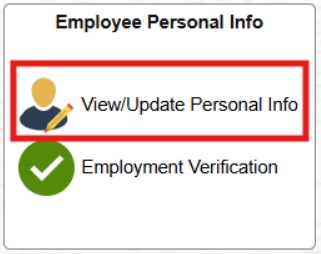
  1. From the HR Links homepage, select the Employee Personal Info tile and then View/Update Personal Info link.

    Screenshot showing Employee Self Serve page with View/Update Personal Info tile highlighted in red.
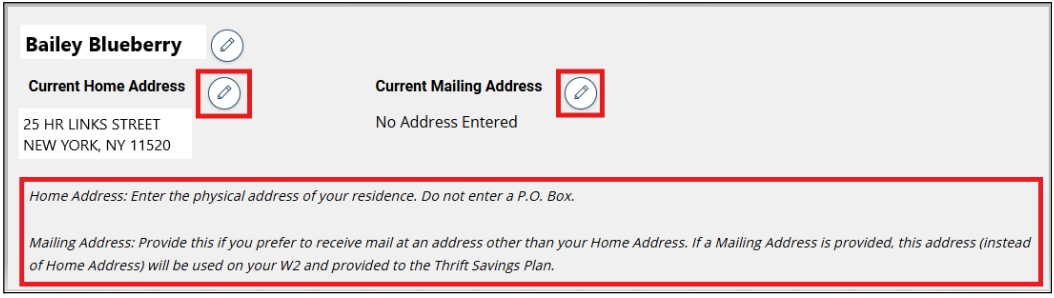
  2. From the View/Update My Personal Info page, select the pencil icon next to Current Home Address to edit your Home Address.

    Updating Home and Mailing Address 1
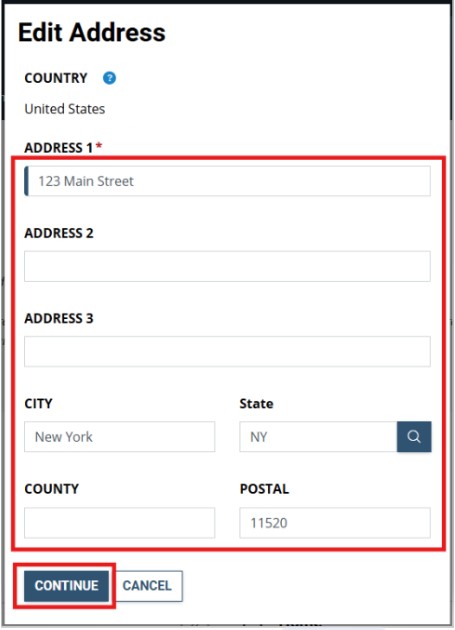
  3. From the Edit Address page, enter your updated home address and click Ok.  Note: Enter the physical address of your residence. Do not enter a P.O. Box.

    Updating Home and Mailing Address 3
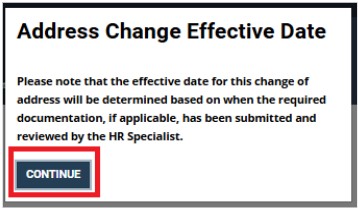
  4. A pop-up message appears explaining how the effective date of the address change is determined. Note: The effective date will automatically be set to the next Pay Period Begin Date following the HR Specialist’s approval of the address change request.  Click Continue.

    Updating Home and Mailing Address 4
  5.  All GSA correspondence is mailed to your Home Address.   However enter a Mailing Address if you prefer to receive mail at an address other than your Home Address. If a Mailing Address is provided, this address (instead of Home Address) will be provided to your federal health benefits carrier and Thrift Savings Plan.

    To update your current Mailing address click  on the pencil icon next to Current Mailing Address.

    Updating Home and Mailing Address 5
  6. Enter your Mailing Address and Click Continue.

    Updating Home and Mailing Address 3
  7. A pop-up message appears explaining how the effective date of the address change is determined. Note: The effective date will automatically be set to the next Pay Period Begin Date following the HR Specialist’s approval of the address change request.  Click Continue.

    Updating Home and Mailing Address 4
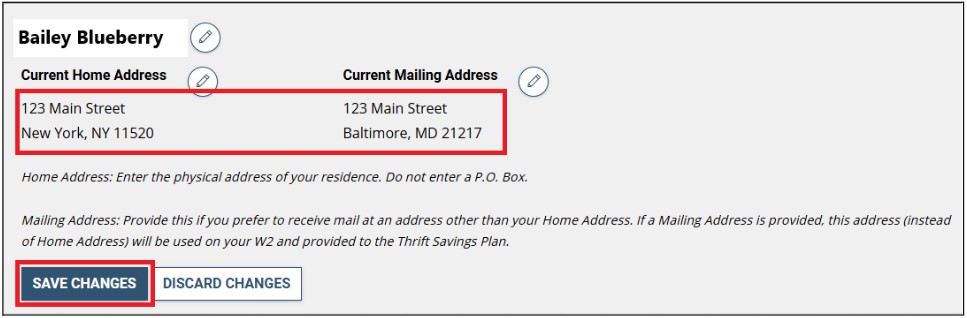
  8. Confirm your updated Home and Mailing address was submitted and click Save Changes.

    Updating Home and Mailing Address save changes
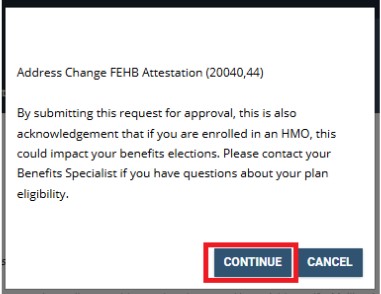
  9. A Pop-Up Message Address Change FEHB Attestation appears.  Click Continue.

    Updating Home and Mailing Address 9
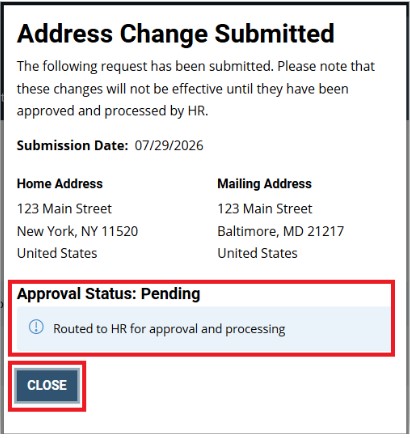
  10. You will get a notification that your Address Change has been Submitted.  Click Close.

    Updating Home and Mailing Address 10
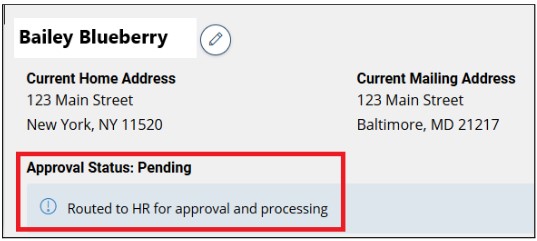
  11. The pending home and mailing address change will display on your Personal Information page.

    Updating Home and Mailing Address 11

Note:   Address change requests are routed to your HR Office for processing.  If your request has not been processed within 5 business days, please contact your HR Office for assistance.  Once HR has processed your request, you will receive an email notification to inform you your address change has been processed.  It will then be displayed on the View/Update My Personal Info page. If you still see your old address, then HR has not yet processed your change.

Print Page Email Page
Last updated: Nov 25, 2025
Top

Home

  • Resources for …
    • Americans with Disabilities
    • Citizens and Consumers
    • Federal Employees
    • GSA Employees
    • Native American affairs
    • Presidential & Congressional Commissions, Boards or Small Agencies
    • Small Business
  • Governmentwide Initiatives
    • Centers of Excellence
    • Digital experience
    • Emergency response
    • Federal Cybersecurity
    • ID, Credentials, and Access Management
    • Information Quality
    • Open Data
    • Technology Modernization Fund
  • Contact Us
  • Organization
    • Leadership Directory
    • Staff Directory
  • References
    • Annual reports
    • Plain Language
    • Budget and Performance
    • Catalogs
    • Orders & Directives
    • Forms
  • Website Information
    • A-Z Index
    • Report a website issue
    • Sitemap
  • Also of Interest
    • Data.gov
    • Whitehouse.gov
  • Tools
    • eBuy
    • eLibrary
    • Contracting forecast tool
    • GSA Advantage
    • GSA Auctions
GSA logo
  • Facebook
  • X
  • LinkedIn
  • YouTube
  • instagram
  • Blog
  • email

JOIN THE CONVERSATION

GSA.gov

An official website of the U.S. General Services Administration
  • Accessibility statement
  • Website Policies
  • Reports
  • Office of the Inspector General
  • No FEAR Act
  • FOIA Requests
  • Board of Contract Appeals
Looking for U.S. government information and services?
Visit USA.gov

PER DIEM LOOK-UP

1 Choose a location

Error, The Per Diem API is not responding. Please try again later.

No results could be found for the location you've entered.

Get my location

OR

OR

Rates for Alaska, Hawaii, and U.S. territories and possessions are set by the Department of Defense.

Rates for foreign countries are set by the Department of State.

2 Choose a date


OR

Rates are available between 10/1/2023 and 09/30/2026.

The End Date of your trip can not occur before the Start Date.


Additional terms and conditions

Traveler reimbursement is based on the location of the work activities and not the accommodations, unless lodging is not available at the work activity, then the agency may authorize the rate where lodging is obtained.

Unless otherwise specified, the per diem locality is defined as "all locations within, or entirely surrounded by, the corporate limits of the key city, including independent entities located within those boundaries."

Per diem localities with county definitions shall include"all locations within, or entirely surrounded by, the corporate limits of the key city as well as the boundaries of the listed counties, including independent entities located within the boundaries of the key city and the listed counties (unless otherwise listed separately)."

When a military installation or Government - related facility(whether or not specifically named) is located partially within more than one city or county boundary, the applicable per diem rate for the entire installation or facility is the higher of the rates which apply to the cities and / or counties, even though part(s) of such activities may be located outside the defined per diem locality.