About security for uncleared external users
The GSA Project Manager is responsible for enforcing security of Kahua projects for external project team members and stakeholders. The GSA PM must make the determination to grant or revoke access based on the external user’s Business Need To Know, Security Clearance Status in relation to the project’s contracts, and the minimal level of privilege (Principle of Least Privilege) the external user needs to perform the job. We work with Kahua to establish user roles that have varying levels of privilege in Kahua including roles for Uncleared Contractors and Uncleared Lessors for external users that do not have a HSPD-12 clearance at the time they require Kahua access.
If users are added to the Uncleared Contractors or Uncleared Lessors group, the GSA PM must review all uncleared group members on an individual basis every 12 months from the date they were added to the Kahua project. This one-year period is not synonymous with the recertification process. The purpose of this review is to confirm the external user’s business need to know, security status on an active contract related to this project, and to prompt the GSA PM to request an exception and extension if necessary. The Kahua National System Administrator, or NSA, will notify PMs as users approach the 12-month termination date. The GSA PM must terminate group membership immediately upon determination of lack of business need or contract closeout or termination.
External access beyond one year is permissible on an exception basis, following a documented process involving GSA PM review and validation of the contract (ensuring it is current) and the user’s continuing access requirement and privileges. Exceptions must be reviewed and renewed annually on an individual basis and managed separate from the annual user recertification process.
The GSA PM/COR must notify the Kahua Program Manager, or KPM, or NSA immediately regarding any change in a user’s background investigation status or project involvement. The NSA will update the security status in Kahua.
Architect/engineer, general contractor, and construction management contractors
The Office of Project Delivery’s architect/engineer, general contractor, and construction management contracts contain a requirement for HSPD-12 clearance. If a contractor does not already have a HSPD-12 clearance, the contractor should begin the HSPD-12 investigation process when the contract starts. Contractors can be approved for a Kahua account before their initial favorable determination, but they will be considered uncleared and must be placed in Kahua’s Uncleared Contractor permission group. PMs must add an automatic termination date in the Project Directory app for their projects for all uncleared contractors.
Lessors
Lessors and their teams are not required to be HSPD-12 compliant. Users without a security clearance may ONLY be added to the Uncleared Lessor group. No additional permissions may be granted.
Create a project directory record from the people sub-app
This action can be executed by the following role: GSA-PM/COR.
Note: The assigned PM listed in the Roster section of the project’s details page will be the first person to have access to the project. The PM will need to assign additional PMs, CORs, or external users who can assist with populating the Project Directory app.
- Open the project using Project Finder in the launch bar.
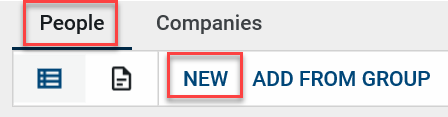
- Select Project Directory > People from the apps launcher.
- Click NEW from the People sub-app.
Details section
- Select the contact person in the Name field. If applicable, the Office field will populate. Note: The contact must exist in the Kahua Contacts app prior to being added to the Project Directory. The GSA PM must also check the security status of the user in the Contacts app before adding the user.
- If applicable, fill in the Contact Team Role, Contact Team Function, Status on Project, and any additional Notes.
Groups section
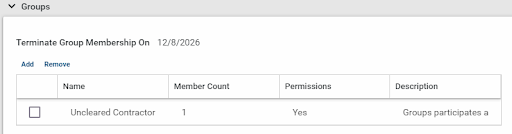
The GSA PM must set an automatic termination date for all Uncleared users utilizing the “Terminate Group Member” feature.
The automatic termination date should be the earliest date that the user no longer requires access, which is no later than the earliest contract Period of Performance end date. If none are applicable, the termination date should be set 12 months from the date of Kahua license assignment.
- Select a date to terminate the user’s access to the project.
- On the specified date, the user will automatically lose access to the project but not their Kahua account.
- If applicable, attach any supporting documentation to the References section using the UPLOAD or ADD KAHUA DOC buttons.
- Once all updates have been made to the Project Directory record, click the Save/Close button at the top of the form.
Assign permission groups to team members
Once team members have been added to the Project Directory, they can be added to the Uncleared Contractor or Uncleared Lessor permission group from the Groups section of the contact record in read-only mode. Assigning an external user to a permission group on the project grants the user access to the project.
- While in the People sub-app of the Project Directory app, click on the contact’s record to view in read-only mode.
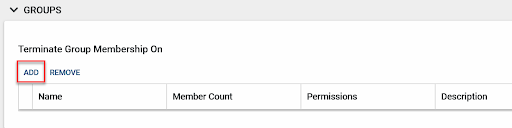
- Scroll to the Groups section, click ADD.
- Select the Uncleared Contractor or Uncleared Lessor permission group.
- Once selected, click the Add button.
The user is now in the appropriate group.


 U.S. General Services Administration